Install AutoCAD LT 2009
- Install AutoCAD LT 2009 (with default settings).
- Install latest AutoCAD LT 2009 Service Pack (from Install folder or Autodesk Support webite)
(needs to be completed when new users log on to a system for the first time).
- If you wish to disable the ribbon, press the Workspace switching button (lower right corner of screen). Set to AutoCAD LT Classic.


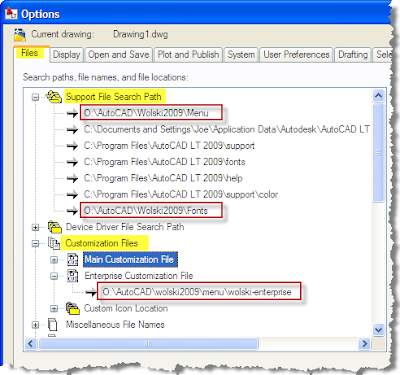
- Start the Options command (Shortcut: OP)
- Set to the File tab and set the following settings (Important: In the support file search path getting the right order is critical).

- Press Ok

